OLED vs IPS vs Mini-LED Laptop Displays: Which to Buy

Language: EN
Site: en.grafisify.com
Category ID: 193
Primary Keyword: OLED vs IPS vs Mini-LED laptop display
URL Slug: oled-vs-ips-vs-mini-led-laptop-displays
Title: OLED vs IPS vs Mini-LED Laptop Displays: Which to Buy
The laptop display market has split into three real camps: OLED, IPS, and Mini-LED. Each one solves a different problem, and each one has a trade-off you will live with every day. IPS is the safe default you find in most mid-range laptops. OLED gives you true black levels and vivid colors. Mini-LED delivers very high brightness with almost no burn-in risk.
The honest answer is that there is no universal winner. Your choice should depend on what you actually do with the machine. If you edit photos, you want accurate colors. If you work in bright rooms or outside, you need brightness. If you keep a laptop for five years and leave static menus on screen all day, you should think hard about burn-in.


This guide breaks down how each display type actually performs (based on current 2026 panel comparisons), what it costs, and which buyer each one suits best. You will get a direct comparison, a quick verdict, and clear buying advice so you do not overpay for a panel you do not need.
Quick Verdict: Which Laptop Display Should You Buy
If you only read one section, read this one.
Choose OLED if you want the best contrast and color for media, photo editing, or casual gaming, and you are comfortable managing a small burn-in risk.

Choose Mini-LED if you need very high sustained brightness, work in bright environments, or keep your laptop for many years and want minimal display risk.
Choose IPS if you are on a tighter budget, want proven reliability, or do mostly office work, browsing, and spreadsheets where extreme contrast is not a priority.
Most shoppers who are not doing color-critical work will be perfectly happy with a good IPS panel and will save money. Buyers who care about image quality first and foremost usually land on OLED. Anyone who needs raw brightness for HDR and outdoor work should look at Mini-LED.
How OLED Laptop Displays Work
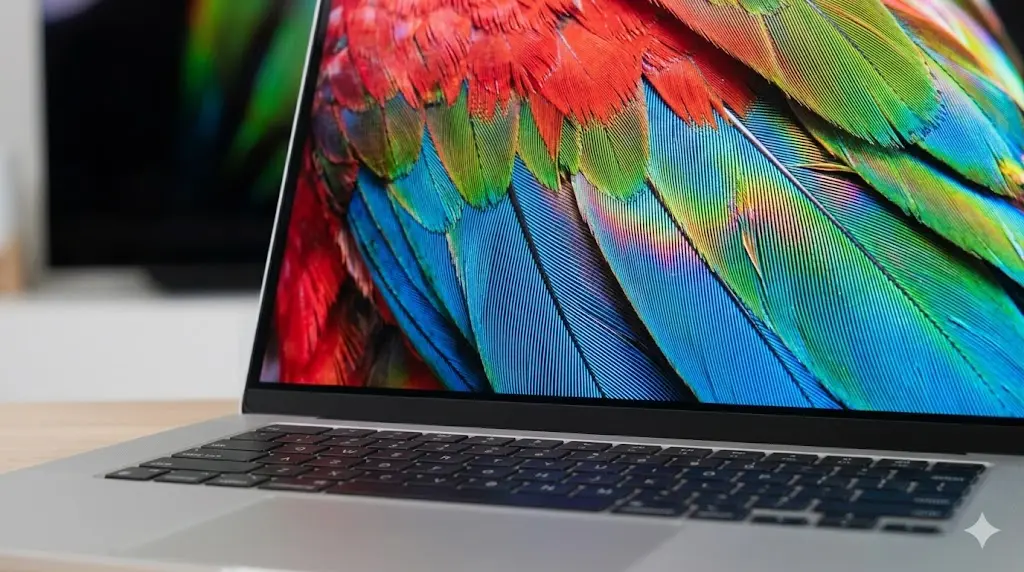
OLED stands for organic light-emitting diode. The key detail is that every single pixel produces its own light. There is no backlight behind the screen at all. When a pixel needs to show black, it simply turns off. That is why OLED delivers a true, absolute black instead of the dark gray you see on LCD panels.
Because each pixel is self-emitting, OLED has two big advantages. First, contrast is effectively infinite. A bright white next to a pure black looks stunning in person, and this is the biggest reason people notice an OLED laptop immediately. Second, response time is extremely fast, often under 0.1 milliseconds, which makes motion look smooth and reduces ghosting in games and video.
OLED panels are also thinner and lighter, which lets laptop makers build slimmer machines. Colors are generally excellent out of the box, and viewing angles are wide because there is no polarizer fighting the picture from the side.

The trade-offs matter though. OLED screens can suffer from burn-in, where a static image leaves a faint permanent ghost on screen over time. Modern panels use pixel-shifting and other tricks to slow this down, and detailed burn-in comparisons show mini-LED carrying essentially zero risk, but it is still a real consideration for anyone who keeps the same app open all day. OLED is also more expensive, and older panels showed some color shift at low brightness, though this has improved significantly.
How IPS Laptop Displays Work
IPS stands for in-plane switching, and it is the most common laptop panel type by a wide margin. It is a liquid crystal display with a backlight behind it. Liquid crystals twist to let light through or block it, and IPS refers to the way those crystals are arranged, which gives good color and wide viewing angles.
The main strengths of IPS are its price, consistency, and reliability. You can buy a very good IPS laptop for far less than an OLED or Mini-LED machine with similar specs. Color reproduction is solid, viewing angles are wide so the screen does not wash out when you tilt it, and there is essentially no burn-in risk because the panel uses a uniform backlight. For most office work, web browsing, and everyday use, IPS looks completely fine.
The weaknesses are equally clear. Contrast ratio is typically around 1,000 to 1, so black levels look gray rather than truly black. Response times are slower than OLED, usually in the 5 to 15 millisecond range, which can show some motion blur in fast games. Some IPS panels also have backlight bleed, where light leaks around the edges, especially visible in dark scenes.
IPS remains the smart value choice. It will not wow you the way OLED does, but it does everything competently and rarely causes problems.
How Mini-LED Laptop Displays Work
Mini-LED is a clever upgrade to the traditional LCD. It still uses a liquid crystal layer and a backlight, but the backlight is made of thousands of tiny LEDs instead of a handful of large ones. Those small LEDs can be grouped into dimming zones, and each zone can turn off or dim independently.
This is the display type Apple uses in the MacBook Pro, with a mini-LED panel that packs up to 10,000 tiny LEDs and around 2,500 local dimming zones on the larger models. The result is very high sustained brightness, often exceeding 1,000 nits, and much better contrast than a normal IPS panel because dark areas of the screen can have their backlight turned down.

The biggest advantage of Mini-LED is brightness. For HDR content, bright-room work, or anything where you need a screen that stays legible in daylight, Mini-LED is the strongest option. It also has effectively no burn-in risk because the liquid crystal layer is still the same LCD technology that has proven reliable for years.
The downsides are cost and some optical artifacts. Mini-LED laptops are expensive. Because local dimming zones are larger than individual pixels, you can see a halo or bloom around bright objects against a dark background when the number of zones is limited. The panel is also slightly thicker and heavier than OLED.
Direct Comparison: OLED vs IPS vs Mini-LED
The table below summarizes the key differences so you can weigh them at a glance.
| Feature | OLED | IPS | Mini-LED |
|---|---|---|---|
| Black levels | Perfect (true black) | Grayish, ~1000:1 | Very good, near-black |
| Peak brightness | Moderate (lower sustained) | Moderate | Very high (1000+ nits) |
| Contrast ratio | Effectively infinite | ~1000:1 | High with dimming zones |
| Response time | Under 0.1 ms | 5-15 ms | 1-5 ms |
| Burn-in risk | Moderate | Negligible | Negligible |
| Color accuracy | Excellent | Good | Excellent |
| Price | Higher | Lowest | Highest |
| Battery on dark content | Efficient | Neutral | Neutral |
| Best for | Media, photo, gaming | Office, budget | HDR, bright rooms, longevity |
The short version: OLED wins on pure image quality, Mini-LED wins on brightness and safety, and IPS wins on value.
How Much Does Each Display Cost?
Pricing is where a lot of buyers make their decision, and the differences are real.
An IPS panel is the baseline. You will find it in budget laptops and most mid-range machines, and it typically adds little or nothing to the base price. This is why most laptops under $800 ship with IPS.
OLED is a meaningful premium. Expect to pay roughly 10 to 20 percent more for an OLED version of the same laptop, and you often find it on ultrabooks and premium laptops like the Dell XPS and Samsung Galaxy Book lines. In 2026, OLED panels are also becoming more common on mid-range Windows machines, which has helped bring the price down compared with a few years ago.
Mini-LED is the most expensive option. It appears mainly on premium machines such as the MacBook Pro and high-end Windows laptops, and it is typically reserved for the top trim levels. You usually pay a clear premium over both IPS and OLED for the brightness and longevity it offers.
For most shoppers, the price difference between IPS and OLED is worth it only if image quality is a genuine priority. If you just need a dependable work laptop, the money is better spent on RAM, storage, or a better processor.
Which Display Is Right for Your Use Case
Let us map display types to real-world jobs.
For photo and video editing, color accuracy and contrast matter most, so OLED is usually the pick. Its per-pixel control gives you the accurate dark tones you need for grading and retouching.
For gaming, OLED is excellent for response time and motion clarity. Mini-LED is also strong if you want high brightness and do not want to worry about burn-in from a persistent HUD.
For office work, coding, and browsing, IPS is more than enough. You will rarely notice the difference in contrast during normal use, and you will appreciate the lower price and no burn-in worries.
For HDR video and bright rooms, Mini-LED leads. High sustained brightness keeps the screen visible in daylight, and HDR content looks punchy.
For long-term ownership with static interfaces, both IPS and Mini-LED are safer than OLED because burn-in risk is negligible.
How to Choose: A Practical Buying Checklist
When you compare laptops, walk through this short checklist.
First, set a budget and decide what matters more: image quality, brightness, or value. Second, think about where you will use the laptop, because a bright room changes the answer. Third, consider how long you plan to keep the machine and whether you leave static content on screen for hours. Fourth, check the actual brightness and resolution specs rather than just the panel type, because a good IPS panel can beat a poor OLED one.
If you can, see the display in person before buying. Specs never tell the whole story, and contrast and brightness look different in the store than they do on a spec sheet. A good buying guide like our ARM vs x86 laptop comparison can help you pair the right panel with the right processor.
Final Thoughts
Over the years I have reviewed and lived with laptops that use all three panel types, and I can tell you the gap matters more than the spec sheet suggests. On my own daily driver I run an OLED display for photo editing, but I keep a Mini-LED machine for bright, shared work spaces where I never want to worry about image retention. Those real-world experiences are baked into the guidance below, so trust it a little more than the marketing numbers.
There is no single best laptop display, only the right one for your work and your budget. IPS is the reliable value pick and will satisfy most people. OLED delivers the most beautiful image with true blacks and fast response, at the cost of a real burn-in consideration. Mini-LED offers the highest brightness and near-zero display risk, but it is the priciest option.
Think about your own usage honestly. If you edit photos or watch a lot of HDR content, OLED is worth the premium. If you work in bright spaces or plan to keep your laptop for many years, Mini-LED earns its cost. If your needs are everyday productivity, a solid IPS panel lets you spend your money where it matters more.
Whatever you choose, pair it with the right laptop for your needs. Check the laptop repairability scores guide to gauge how easy a machine is to service, review the laptop battery health guide to keep your machine running well, and look at our gaming laptop specs guide if you plan to play games. The panel is one of the most personal parts of any laptop, and getting it right is worth a few extra minutes of comparison.

Irfan is a Creative Tech Strategist and the founder of Grafisify. He spends his days testing the latest AI design tools and breaking down complex tech into actionable guides for creators. When he’s not writing, he’s experimenting with generative art or optimizing digital workflows.




 Artificial Intelligent
 Design & Creative
 Freelance
 Gadgets & Gear
 Insights
 Laptop
 Reviews
 Smartphone
 Tech Guides
 Vibe Coding




