How to Connect MCP Servers to Your Coding Agent
Why Your Coding Agent Needs MCP Servers
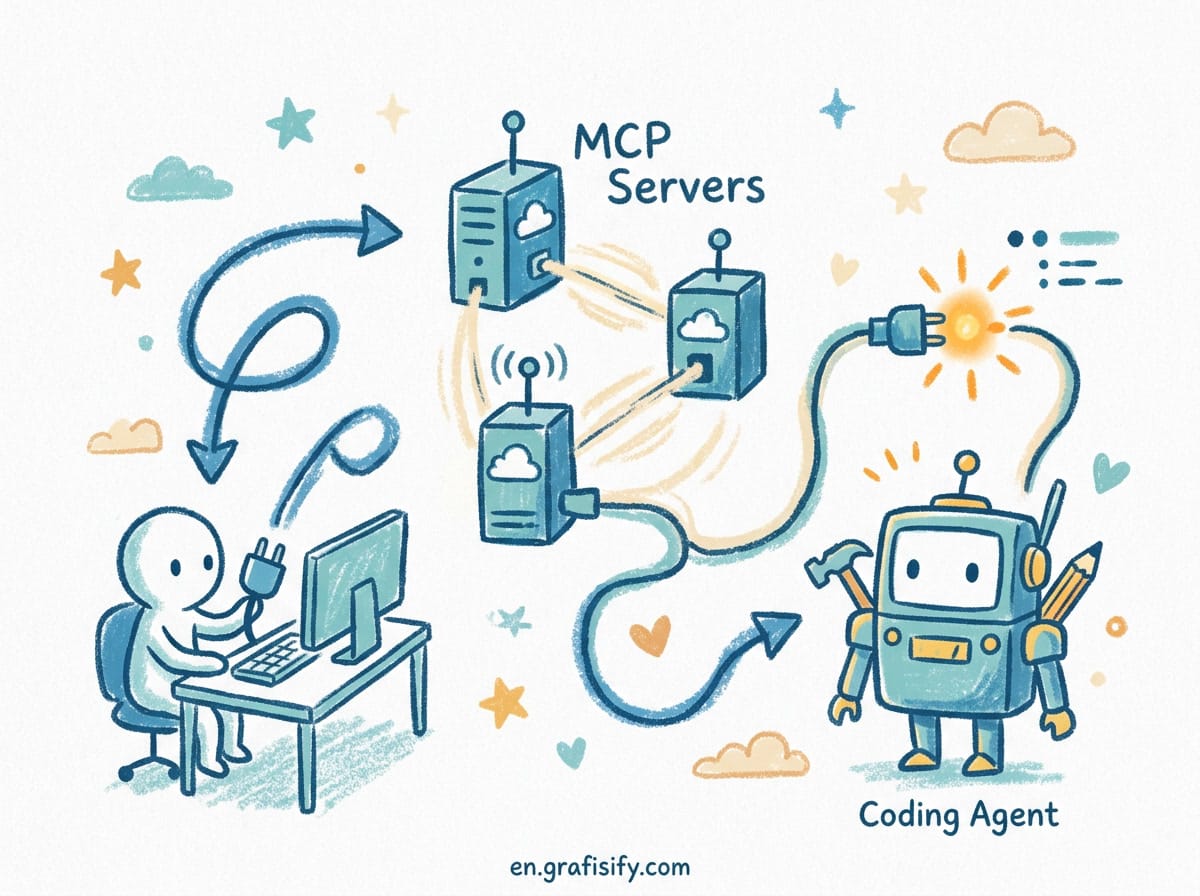
A coding agent like Claude Code, Cursor, or Cline can edit files and run a terminal inside your repo. What it cannot do on its own is reach your GitHub issues, query a database, or pull docs from an internal wiki. Model Context Protocol (MCP) closes that gap. It is an open standard that lets an AI client talk to external tools and data sources through one consistent interface.
Without MCP, every new tool means a new integration written for one specific client. A server built for one assistant is useless for another. MCP removes that wall: a single server that queries your company’s ticketing system can be wired into several different coding assistants without rewriting it for each one. That reuse is the entire economic argument for the protocol.
Think of MCP as a USB-C port for AI. One server you write or install exposes specific capabilities, and any compliant client can use it. Build the integration once and every assistant you use inherits it. That reuse is the core reason MCP shows up so often in coverage of AI coding tools.
The verdict up front: if your agent only works inside the codebase and never touches your real tooling, you are leaving most of its value on the table. MCP is the fastest way to fix that.
What an MCP Server Actually Is
An MCP server is a small program, usually Node.js or Python, that speaks the protocol over a transport. The two transports you will meet are stdio (a local subprocess launched by your client) and Streamable HTTP (a remote server reached by URL, the recommended approach for remote deployment per the 2025-11-25 and 2026-07-28 spec revisions).
Each server exposes three building blocks:
- Tools are functions the model can call, typically with your approval. A GitHub server might expose
list_issuesorcreate_pr. - Resources are file-like data the client can read, such as an API response or a file’s contents.
- Prompts are pre-written templates that help you accomplish a specific task.
Microsoft’s official mcp-for-beginners curriculum describes MCP as the standard that lets applications provide context to LLMs, maintained across official SDKs for Python, TypeScript, Java, C#, Go, Rust, Kotlin, and Swift.

Prerequisites Before You Start
You need a working runtime for both Node.js and Python even if you only plan to use one language today. Many official reference servers are Node-based and run through npx, while custom servers often use Python with the uv package manager.
| Requirement | Minimum Version | Why You Need It |
|---|---|---|
| Node.js + npm | Node 18 or later (20+ recommended) | Runs most reference MCP servers via npx |
| Python | 3.10 or later | Runs custom MCP servers with the official SDK |
| uv (Python package manager) | Latest release | Anthropic’s documented tool for running Python servers |
| MCP-compatible client | Claude Code, Cursor, or Cline, latest | The host that connects to your servers |
A command-line terminal is non-negotiable. Every server, local or remote, is wired up through a JSON config file and launched from a shell. If you have never opened a terminal before, budget extra time and move slowly through each step.
Connect Your First Server: Filesystem
The filesystem server is the standard first stop. It gives your client read and write access to one folder you specify, with no external account required. For Claude Desktop, edit claude_desktop_config.json and add an entry under mcpServers:

{
  "mcpServers": {
    "filesystem": {
      "command": "npx",
      "args": ["-y", "@modelcontextprotocol/server-filesystem", "/absolute/path/to/your/project"]
    }
  }
}
Replace the path with a real folder on your machine. The npx -y flag downloads and runs the server the first time it is needed, so you do not install it globally first. Point it at a narrow project directory, never your entire home folder.
Claude Code handles scope differently. It supports a project-scoped .mcp.json file inside a single project root, so servers relevant to one codebase do not clutter every other project. Deciding up front whether a server belongs globally or locally is one of the most common configuration mistakes people make.
Add a Second Server: GitHub
Connect a second server to see how multiple entries coexist in one config. Generate a GitHub personal access token with minimal scopes, read access to the repos you want the assistant to see is enough for testing, then add it:

{
  "mcpServers": {
    "filesystem": { "command": "npx", "args": ["-y", "@modelcontextprotocol/server-filesystem", "/path/to/project"] },
    "github": { "command": "npx", "args": ["-y", "@modelcontextprotocol/server-github"], "env": { "GITHUB_TOKEN": "your_token_here" } }
  }
}
Save the file and fully quit the client, then reopen it. Editing config while the app runs has no effect until it relaunches. Most clients show a small tools or connector icon near the message box. Clicking it should list both servers with the individual tools they expose. If a server shows as errored instead of connected, that is the moment to troubleshoot before adding more.
Test That the Tools Actually Fire
Configuration only proves the connection works. The real test is asking the model to use it. In a new chat, ask something scoped to the folder you configured, such as “list the files in my projects folder” or “read README.md and summarize it.” The client should show a visible tool-call indicator rather than guessing an answer.
Spend a few minutes on this step with each new server. A server that connects but never gets called wastes the setup effort and hides a misconfiguration. The tool-call card is your proof the wiring is correct, not just the config file parsing without error.
Watch for a subtle failure mode: if the model answers instantly with no tool-call card, it is likely answering from general knowledge instead of actually querying your server. That gap is easy to miss and worth catching early.
Connect a Remote Server Over HTTP
Local servers cover personal use, but many production servers run remotely and are reached over Streamable HTTP instead of stdio. The config shape changes: instead of a command and args that launch a local process, you provide a URL.
{
  "mcpServers": {
    "remote-api": {
      "type": "http",
      "url": "https://your-mcp-server.example.com/mcp"
    }
  }
}
Streamable HTTP is one of the areas the 2026-07-28 spec revision touched, so confirm your client and server target the same spec version before debugging connection issues.
Write Your Own MCP Server in Python
Installing other people’s servers gets you connected fast, but writing your own is what makes MCP genuinely useful. It is how you expose your own scripts and business logic to a model. The official Python SDK, FastMCP, keeps the boilerplate small. A minimal server with one tool looks like this:
from mcp.server.fastmcp import FastMCP

mcp = FastMCP("dev-toolkit")

@mcp.tool()
def slugify(text: str) -> str:
    """Convert a string into a URL-safe slug."""
    import re
    return re.sub(r"[^a-z0-9]+", "-", text.lower()).strip("-")

if __name__ == "__main__":
    mcp.run(transport="stdio")
Register it in your client config, restart, and ask “slugify the text ‘MCP Servers Are Useful'”. A successful tool call means you have gone from zero to a working custom integration. The same pattern scales to wrapping internal APIs, database queries, or any script you already run.
Security: Apply Least Privilege
Every server you connect is a new capability the model can invoke, sometimes with little friction. Point the filesystem server at a narrow project folder, not your home directory. Scope GitHub tokens to read-only access unless you specifically need the assistant to open issues or push commits. Review what each server can actually do before trusting it with broad access, since most reference servers publish their tool list.
Production servers add harder boundaries. The open-source coding-mcp project, for example, confines agents to registered project roots, runs as a restricted system user with no sudo, and supports an allowlist-based command runner with timeouts. Those patterns matter the moment a server faces anything beyond your local machine.
Key Takeaways
- MCP is the open standard that connects coding agents to external tools and data through one interface.
- Start with the filesystem and GitHub reference servers, adding one at a time and restarting between each.
- Verify tools actually fire by watching for a visible tool-call indicator, not just a fluent answer.
- Remote servers use a URL over Streamable HTTP instead of a local command.
- Writing your own Python server with FastMCP takes a few lines and unlocks your own internal tools.
- Apply least privilege: narrow folders, read-only tokens, and reviewed tool lists.
Frequently Asked Questions
Do I need to know how to code to use MCP servers? No. Installing pre-built servers like filesystem or GitHub only requires editing a JSON config file. Coding is only needed if you want to build your own server.
Which clients support MCP? Claude Code, Cursor, Cline, Windsurf, VS Code, and Claude Desktop all support it. The mcpServers config pattern applies to each, with small differences in file name and location.
Should I use stdio or HTTP? Use stdio for local agents on your machine. Use Streamable HTTP when the server runs on a different host or you need multiple clients to share it.
Is MCP safe to give file access? It is as safe as the scope you grant. Point servers at specific project folders, never your whole home directory, and review each server’s tool list before connecting.
Final Thoughts
MCP turns a coding agent from a fast typist inside one repo into a worker that reaches the systems you actually use. Start with two reference servers, confirm the tools fire, then write one small server of your own. The protocol is stable across the major clients, so the time you spend learning it pays off everywhere. The next post will cover writing rules files that keep these agents on track across a full project.

Irfan is a Creative Tech Strategist and the founder of Grafisify. He spends his days testing the latest AI design tools and breaking down complex tech into actionable guides for creators. When he’s not writing, he’s experimenting with generative art or optimizing digital workflows.




 Artificial Intelligent
 Design & Creative
 Freelance
 Gadgets & Gear
 Insights
 Laptop
 Reviews
 Smartphone
 Tech Guides
 Vibe Coding





