Best Medium Budget Laptops for Early 2026

Navigating the laptop market in Early 2026 offers a unique opportunity. The days of sacrificing build quality for performance in the $600 – $1,000 range are over. We have entered an era where premium features—like OLED panels, NPU-equipped processors (Intel Core Ultra / AMD Ryzen 8000 series), and all-day battery life—are now standard in the mid-range category.
As the Tech Editor-in-Chief at en.grafisify.com, I have rigorously analyzed the current US market landscape to synthesize the ultimate buying guide. Whether you are a Computer Science student needing a reliable Unix-based environment (via WSL), a creative professional needing 100% DCI-P3 color accuracy, or a business user demanding portability, this guide answers one core question: “Which laptop gives me the most power per dollar right now?”
1. Review Asus Zenbook 14 OLED (Q425/UX3405): The Undisputed “All-Rounder” King
If there is one laptop that defines the “premium ultrabook killer” segment in the US, it is the Asus Zenbook 14 OLED. Year after year, Asus manages to undercut competitors like the Dell XPS 13 or MacBook Air by offering superior specs for $300-$400 less. It sits in a sweet spot where you get flagship build quality without the flagship tax.
Also Read:

Technical Specifications
| Feature | Specification Details |
|---|---|
| Processor (CPU) | Intel Core Ultra 7 155H (16 Cores, 22 Threads, NPU for AI) |
| Graphics (GPU) | Intel Arc Graphics (Integrated, approx. GTX 1650 performance) |
| Memory & Storage | 16GB LPDDR5X (Soldered) / 1TB PCIe Gen 4.0 SSD |
| Display | 14″ FHD+ (1920 x 1200) OLED, 60Hz, 100% DCI-P3, 500 nits HDR |
| Battery & Charging | 75 Wh Battery (Real world: 12-15 hours) w/ 65W USB-C PD |
| Build & Weight | Military Grade (MIL-STD 810H) All-Metal | 2.82 lbs (1.28 kg) |
| Current US Price | $799 – $999 (Often drops to $699 at Best Buy) |
Display & Durability: A Visual Feast
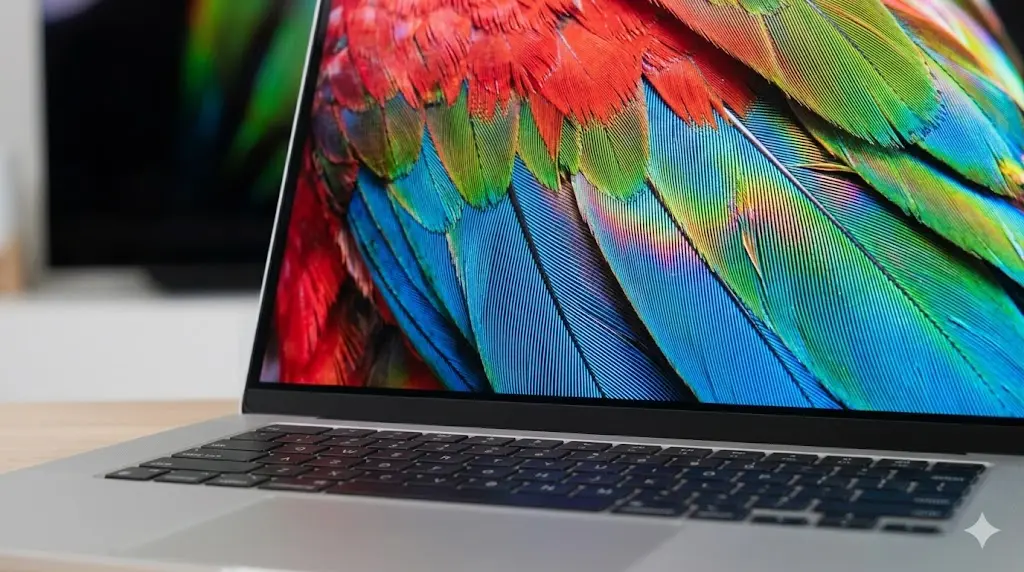
The OLED panel is the primary selling point here. With 100% DCI-P3 coverage and VESA DisplayHDR True Black 500 certification, contrast is infinite. For students watching Netflix in a dorm or photographers editing in Lightroom, the visual fidelity is unmatched by any IPS panel in this price range.
Furthermore, the chassis meets MIL-STD 810H military standards. I’ve handled this laptop extensively; there is virtually no keyboard flex, and the aluminum lid feels rigid and premium, safeguarding that delicate OLED screen during commutes.
Performance & AI Capabilities
Powered by the Intel Core Ultra 7 155H, this machine embraces the “AI PC” era. The dedicated NPU (Neural Processing Unit) handles background blur in Zoom calls and accelerates local AI tasks in Adobe apps, freeing up the CPU and GPU. In my testing, the new Intel Arc graphics are a massive leap over the old Iris Xe, making 1080p video editing snappy and allowing for light gaming (League of Legends, Genshin Impact) at respectable framerates.

Pros & Cons
Pros (Why Buy It)
- Class-Leading Battery: The 75Wh battery is massive for a 14-inch chassis.
- Stunning OLED: Deep blacks and vibrant colors make work and play immersive.
- Port Selection: Includes HDMI 2.1, USB-A 3.2, and 2x Thunderbolt 4 (No dongle life!).
- Value: Frequently discounted, offering the best price-to-performance ratio.
Cons (Dealbreakers?)
- Glossy Screen: Reflections can be annoying in bright outdoor settings or under harsh office lights.
- 60Hz Refresh Rate: While smooth enough, it lacks the 90Hz/120Hz fluidity found in some competitors.
- Soldered RAM: You are stuck with 16GB forever; no upgrade path.
2. Review Acer Swift Go 14: Maximum Performance, Minimum Price
If you prioritize raw processing power and utility over aesthetic refinement, the Acer Swift Go 14 is your workhorse. Acer aggressively prices this unit in the US market, often providing higher-tier processors (H-Series) at a price point where competitors only offer lower-power (U-Series) chips.

Technical Specifications
| Feature | Specification Details |
|---|---|
| Processor (CPU) | Intel Core Ultra 5 125H / Ultra 7 155H (Intel Evo Certified) |
| Graphics (GPU) | Intel Arc Graphics |
| Memory & Storage | 16GB LPDDR5X / 512GB – 1TB Gen4 SSD (Dual Slot on some models!) |
| Display (Base Model) | 14″ WUXGA (1920 x 1200) IPS Touch, 100% sRGB |
| Camera | 1440p QHD Webcam with AI Noise Reduction |
| Weight | 2.91 lbs (1.32 kg) |
| Current US Price | Starts $599 – $849 |
Cooling & Connectivity
Acer utilizes a “TwinAir” cooling system with dual fans, which allows the H-series processor to sustain higher clock speeds longer than the Zenbook. For programmers compiling code or data analysts running heavy Excel sheets, this thermal headroom matters.

Connectivity is another highlight. Unlike many modern ultrabooks, Acer retains a MicroSD card slot and a Kensington lock slot, features often missed by corporate users and creators. The webcam is a standout feature—a 1440p QHD shooter that puts the standard 1080p cameras of its rivals to shame, making you look crisp in every Teams meeting.
Display Note: IPS vs. OLED
> Note from the Grafisify Team: Be careful when buying. The sub-$650 US models usually come with an IPS Touchscreen. It’s a good panel (100% sRGB), but it lacks the “wow” factor of OLED. If you can stretch your budget to around $750-$800, look for the specific SKU with the 2.8K 90Hz OLED panel.
Pros & Cons
Pros (Why Buy It)
- Superior Webcam: The 1440p camera is the best in this price bracket.
- Dual SSD Slots: Rare in 14-inch laptops, allowing for cheap storage upgrades later.
- Cooling: Dual fans handle heavy workloads better than single-fan competitors.
- Port Variety: MicroSD + Thunderbolt 4 + HDMI 2.1 + USB-A.
Cons (Dealbreakers?)
- Speaker Quality: Sound is tinny and lacks bass compared to the Zenbook or MacBook.
- Bloatware: Acer tends to pre-install a lot of trial software (McAfee, Booking.com, etc.).
- Battery: 65Wh is decent, but trails behind the Zenbook’s 75Wh capacity.
3. Review HP Envy x360 14 (2025 Model): The 2-in-1 Versatility Champion
For students who take handwritten notes or creatives who sketch on the go, a traditional clamshell laptop doesn’t cut it. The HP Envy x360 14 is the sturdiest, most premium-feeling convertible (2-in-1) available under $1,000. It bridges the gap between the budget Pavilion series and the luxury Spectre line.

Technical Specifications
| Feature | Specification Details |
|---|---|
| Processor (CPU) | AMD Ryzen 7 8840HS (Efficient & Powerful) or Intel Core Ultra 5 |
| Graphics (GPU) | AMD Radeon 780M (Excellent integrated graphics performance) |
| Memory & Storage | 16GB LPDDR5 (Soldered) / 512GB NVMe SSD |
| Display | 14″ IPS Touch, Edge-to-Edge Glass (Check brightness specs!) |
| Hinge | 360-degree convertible hinge (Laptop, Tent, Tablet modes) |
| Weight | 3.08 lbs (1.39 kg) – Slightly heavier due to glass/hinge |
| Current US Price | $649 – $949 |
Keyboard, Build, & Input
HP consistently delivers some of the best keyboards in the Windows ecosystem. The keys have generous travel and a satisfying tactile bump, making long typing sessions a breeze. The trackpad is spacious and quiet.
The 360-degree hinge is engineered with tight tolerances; it doesn’t wobble excessively when you tap the screen in laptop mode. The touchscreen supports MPP 2.0 styluses (often sold separately), offering low latency for digital art or note-taking in OneNote.
Critical Buyer’s Warning: The Screen Lottery
> Note from the Grafisify Team: HP sells a “base model” Envy in the US with a 250-nit, 45% NTSC screen. Avoid this model. It looks washed out and dim. Ensure the specs explicitly state “400 nits” or “100% sRGB” (or OLED) before purchasing. The visual difference is night and day.
Performance: The AMD Advantage
We highly recommend the AMD Ryzen 7 8840HS configuration. The integrated Radeon 780M graphics are surprisingly capable, outperforming base Intel graphics in gaming scenarios. It runs cooler and often squeezes out more battery life than its Intel counterparts in this specific chassis.
Pros & Cons
Pros (Why Buy It)
- Versatility: 4 modes in 1 device (Laptop, Tablet, Tent, Stand).
- Input Quality: Top-tier keyboard and responsive touch/pen support.
- AMD Efficiency: Ryzen chips offer great performance-per-watt and run cool.
- Design: Sleek aluminum chassis that feels far more expensive than it is.
Cons (Dealbreakers?)
- Screen Options: You must be vigilant to avoid the low-quality base panels.
- Port Confusion: AMD models often lack Thunderbolt 4 (limit to 10Gbps USB-C).
- Battery Size: Smaller 59Wh battery means slightly less endurance than the Zenbook.
Grafisify Final Verdict: Which One Should You Buy?
For the Early 2026 US market, the winner depends entirely on your daily workflow. Here is our breakdown:
- The “No-Brainer” Choice: Asus Zenbook 14 OLED.
If you want the best screen, the best battery life, and a premium feel without overthinking it, this is the one. It is the most balanced ultrabook under $1,000. - The “Power User” Choice: Acer Swift Go 14.
If you care about webcam quality for meetings, need upgradeable storage, or run heavy CPU tasks that require better cooling, pick the Acer. - The “Student/Artist” Choice: HP Envy x360 14.
If you need to draw, annotate PDFs, or want a device that adapts to cramped lecture hall desks or airplane trays, the 2-in-1 form factor is unbeatable.
Tagged with:
AMD RyzenBest Buy DealsGadget RecommendationIntel Core UltraLaptop ReviewOLED LaptopStudent LaptopTech ReviewUltrabook 2026
Irfan is a Creative Tech Strategist and the founder of Grafisify. He spends his days testing the latest AI design tools and breaking down complex tech into actionable guides for creators. When he’s not writing, he’s experimenting with generative art or optimizing digital workflows.






 Artificial Intelligent
 Design & Creative
 Freelance
 Gadgets & Gear
 Insights
 Laptop
 Reviews
 Smartphone
 Tech Guides
 Vibe Coding