PostgreSQL vs SQLite for Local AI Apps: When to Upgrade
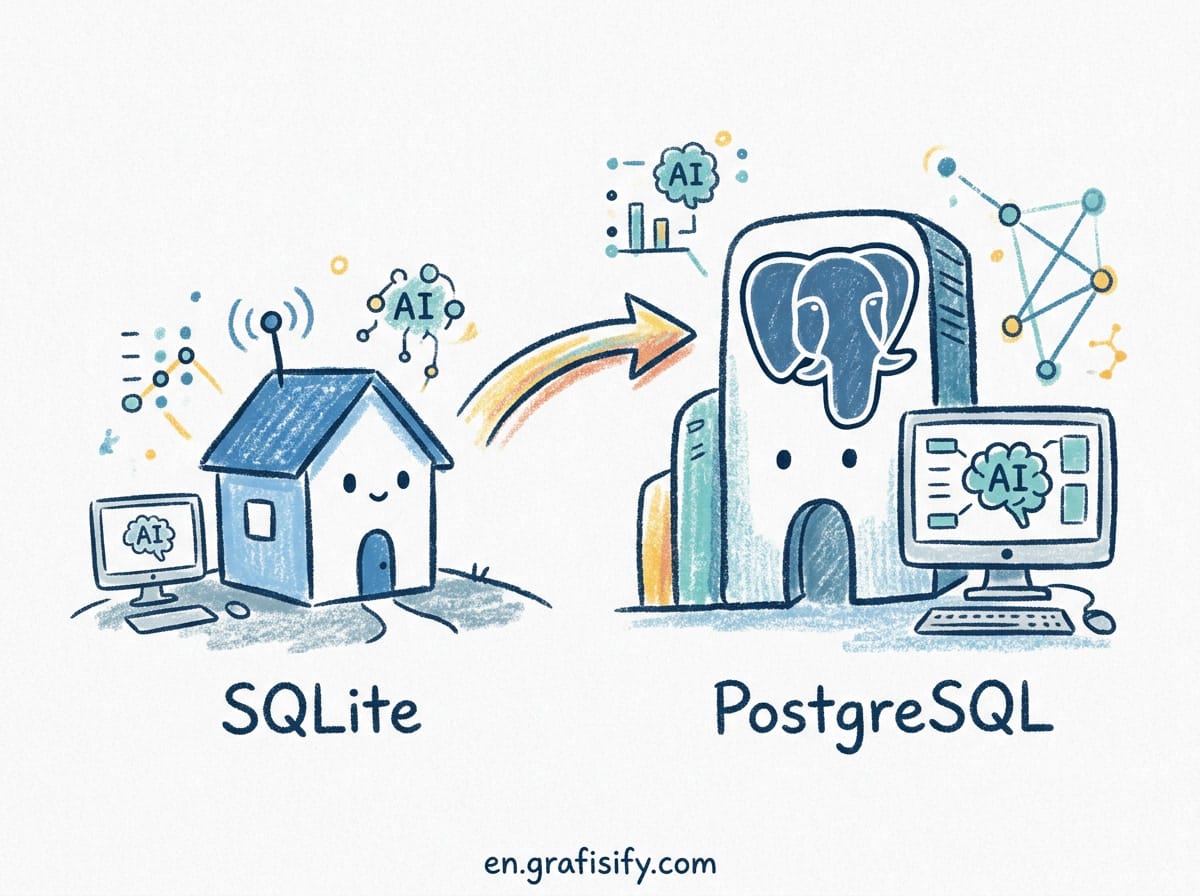
Verdict: SQLite or PostgreSQL for Your AI App?
Pick sqlite-vec if you build a desktop application, mobile app, CLI tool, edge worker, or autonomous AI agent carrying its own local memory file. SQLite runs in-process with zero network overhead, zero server maintenance, and deterministic portable backups. Pick PostgreSQL with pgvector if your application receives concurrent writes from multiple web clients, requires strict row-level access control, or joins vector similarity scores against relational tables in a single SQL query.
Choosing the underlying database for an AI application used to mean picking a dedicated vector cloud service like Pinecone or Qdrant. In 2026, the consensus has shifted toward putting vectors directly inside the relational database you already run. The decision now sits at an architectural level: an embedded single-file engine versus a client-server database cluster.
Here is how to evaluate sqlite-vec and PostgreSQL (pgvector) across performance, concurrency, deployment complexity, and memory management for your next AI project.
Architecture: In-Process Library vs Client-Server Process
The core difference between sqlite-vec and pgvector mirrors the difference between SQLite and PostgreSQL itself. SQLite is an in-process C library. When you run SQLite with sqlite-vec, vector search executes inside your application’s memory space and CPU thread. There are no network sockets, no connection pools, and no external daemon processes to manage.
PostgreSQL runs as a separate background process or cluster of containers listening on port 5432. Applications communicate over a TCP connection using binary or text protocols. When you execute a vector query with pgvector, the server handles query parsing, planning, index scanning, and page caching independently from your application server.
This architectural boundary dictates every operational trade-off in your AI application:
- Network Overhead: sqlite-vec executes queries in microseconds with zero network serialization delay. pgvector incurs a 1ms to 15ms network round-trip depending on VPC distance and connection pooling configuration.
- Deployment Footprint: sqlite-vec requires zero infrastructure. A single SQLite file contains all relational tables, FTS5 text indexes, and vector embeddings. pgvector requires provisioning, securing, and monitoring a Postgres instance plus daily backup schedules.
- Resource Isolation: sqlite-vec shares memory and CPU with your application process. A memory leak in your app can starve the vector search engine. pgvector manages its own buffer pool (shared_buffers) and background worker processes, isolating database workloads from application bugs.
Concurrency and Write Scaling: The WAL Boundary
Concurrency is the clearest dividing line between these two database models. SQLite uses Write-Ahead Logging (WAL) mode to permit unlimited simultaneous reader processes alongside exactly one writer process. While readers do not block writers and writers do not block readers, all concurrent write operations are serialized through a single database lock.
If your AI application ingests continuous real-time data streams from thousands of concurrent users, such as live chat logs or telemetry, SQLite will throw database locked errors or queue write latency. In contrast, PostgreSQL uses Multi-Version Concurrency Control (MVCC) with row-level locking to handle thousands of concurrent write transactions across multiple CPU cores without serializing access.
| Feature / Metric | sqlite-vec (Embedded) | PostgreSQL + pgvector |
|---|---|---|
| Deployment Model | In-process C library (.so / .dylib / .dll) | Client-server background process / cluster |
| Write Concurrency | Single writer at a time (WAL serialization) | High concurrency (MVCC & row-level locks) |
| Query Latency (Local) | Sub-millisecond (0.1ms – 0.5ms) | 1ms – 15ms (includes network IPC overhead) |
| Index Types Supported | Exact KNN (vec0), flat SIMD brute-force | HNSW (Hierarchical Navigable Small World), IVFFlat |
| Max Practical Vector Volume | Up to ~500,000 vectors per single file | Tens of millions + horizontally scalable |
| Relational JOIN Capabilities | Basic virtual table joins | Full SQL, complex joins, CTEs, window functions |
| Row-Level Security | No built-in RLS | Native RLS policies for multi-tenant isolation |
| Backup / Portability | Copy one file, done | pg_dump, WAL archiving, point-in-time recovery |
Vector Search Implementation: Exact KNN vs HNSW
Vector search performance depends heavily on the index algorithm used by the extension. Understanding these algorithms reveals the scalability boundaries of each tool.
sqlite-vec: SIMD-Accelerated Exact Nearest Neighbors
sqlite-vec uses the vec0 virtual table module. It stores vectors as packed binary float32 arrays on disk. When you execute a vector match query, sqlite-vec performs an exact K-Nearest Neighbor (KNN) scan using hardware SIMD (AVX2, NEON) instruction sets.
Also Read:

Because brute-force exact KNN scans every vector in the database, recall is always 100%. For datasets up to 100,000 vectors, such as a personal knowledge base or local document store, search queries execute in under 10 milliseconds on modern CPUs. However, query latency scales linearly with dataset size. Scanning 1,000,000 vectors means reading hundreds of megabytes of raw float data on every query, which pushes response times past 300ms.
pgvector: HNSW and Iterative Index Scans
pgvector supports approximate nearest neighbor (ANN) indexes, specifically HNSW (Hierarchical Navigable Small World) and IVFFlat. HNSW builds a multi-layer graph structure that allows logarithmic search complexity, letting you query millions of high-dimensional vectors in single-digit milliseconds.
In addition, pgvector 0.8+ introduced iterative index scans. In older vector extension setups, filtering vectors with a WHERE clause would scan the vector index first and then filter out non-matching rows, often returning zero results if filters were too restrictive. Iterative index scans continuously traverse the HNSW graph until the target number of matching rows satisfying the SQL WHERE clause are found, which fixes a common production failure mode in filtered retrieval.
Memory and Storage Constraints for Local AI
Storage math changes when embeddings move from a remote API to a local disk. A single 1536-dimensional OpenAI embedding consumes 6KB as packed float32. One hundred thousand of those vectors requires 600MB of raw vector storage before accounting for relational metadata or index overhead. sqlite-vec stores these vectors inside the same SQLite file as your application tables, which means the entire knowledge base can be copied, zipped, or version controlled as one artifact.
PostgreSQL stores vectors in heap pages with its own page layout and tuple headers, then duplicates vector data inside the HNSW index. That doubles storage requirements at index build time. The tradeoff buys you sub-linear query scaling, which matters when your corpus crosses the million-vector mark.
For teams running models locally through tooling like Ollama or llama.cpp, keeping vectors in SQLite also keeps the retrieval step inside the same process boundary as inference. Nothing leaves the machine. That matters for compliance-sensitive workloads where a data residency clause forbids shipping text to an external embedding endpoint.
When to Choose sqlite-vec
sqlite-vec is the ideal database choice when portability, zero operational overhead, and local privacy are your primary engineering requirements:
- Local-First & Desktop Applications: Apps built with Electron, Tauri, Flutter, or native desktop frameworks that need offline semantic search over local user documents.
- Autonomous AI Agent Memory: AI agents that carry long-term memory state in a single portable SQLite file that can be checked into version control or transferred between machines.
- Edge & Mobile Deployments: Mobile applications (iOS/Android) or Cloudflare Workers / AWS Lambda edge functions where running a client-server Postgres instance is impossible or too slow.
- Privacy-Compliant RAG: Air-gapped applications processing sensitive legal, financial, or medical contracts that must never transmit raw text or embeddings across external network boundaries.
- Prototyping & CLI Tools: Internal scripts that need vector search without standing up a database server. Ship a binary plus a .db file and you are done.
When to Choose PostgreSQL (pgvector)
PostgreSQL with pgvector is the enterprise-grade choice when your application demands scale, multi-tenancy, and complex transactional logic:
- Multi-Tenant SaaS Applications: Web applications where hundreds of users simultaneously create, update, and search document embeddings, and where tenant isolation is enforced through row-level security policies.
- Relational & Vector Data Fusion: Systems requiring complex SQL queries that join vector similarity results against relational business tables, user permissions, and transactional records in a single query.
- Large Vector Datasets: Corpora containing over 500,000 vector embeddings where approximate index structures (HNSW) are required to keep query latency below 20ms.
- Existing Postgres Infrastructure: Projects where PostgreSQL is already running in production, eliminating the need to adopt, monitor, and back up a secondary database engine.
- High Availability Requirements: Services that need streaming replication, automated failover, and point-in-time recovery for the vector store alongside transactional data.
Migration Path: sqlite-vec to pgvector
Teams often start local and scale upward. Moving from sqlite-vec to pgvector is a data export job rather than an application rewrite, because both engines accept standard SQL. Export rows from the vec0 virtual table, transform packed binary vectors into the pgvector text format, then bulk load into a vector column and rebuild the HNSW index. The SQL query layer in your application changes only in connection string and index hint syntax.
The reverse path is equally viable. A pgvector-backed SaaS feature can ship a local single-user mode by exporting that tenant’s rows into a SQLite file. Some teams use this pattern to offer an offline mode or a portable demo that runs from a USB drive.
Key Takeaways for Developers
Do not select a database based solely on synthetic benchmark scores. Match the database engine to your software architecture:
- Single User / Single Process: Choose sqlite-vec for zero maintenance, local-first privacy, and instant in-process execution.
- Multi-User / Web Service: Choose PostgreSQL with pgvector for concurrent write handling, row-level security, HNSW approximate search, and enterprise scalability.
- Storage Math First: Multiply vector count by dimensions by 4 bytes before choosing an engine. That single calculation tells you whether brute-force scanning remains viable.
- Keep Embeddings Close to Inference: Local retrieval pairs naturally with local models. Cross-process network hops add latency that erodes the speed advantage of local inference.
Both extensions are mature, actively maintained, and production-proven. Pick the one whose deployment model matches the shape of your application, and the vector search performance will follow.

Irfan is a Creative Tech Strategist and the founder of Grafisify. He spends his days testing the latest AI design tools and breaking down complex tech into actionable guides for creators. When he’s not writing, he’s experimenting with generative art or optimizing digital workflows.






 Artificial Intelligent
 Design & Creative
 Freelance
 Gadgets & Gear
 Insights
 Laptop
 Reviews
 Smartphone
 Tech Guides
 Vibe Coding




