Supabase Tutorial Beginners Full Stack: Build Your First App
Supabase Tutorial Beginners Full Stack: Build Your First App
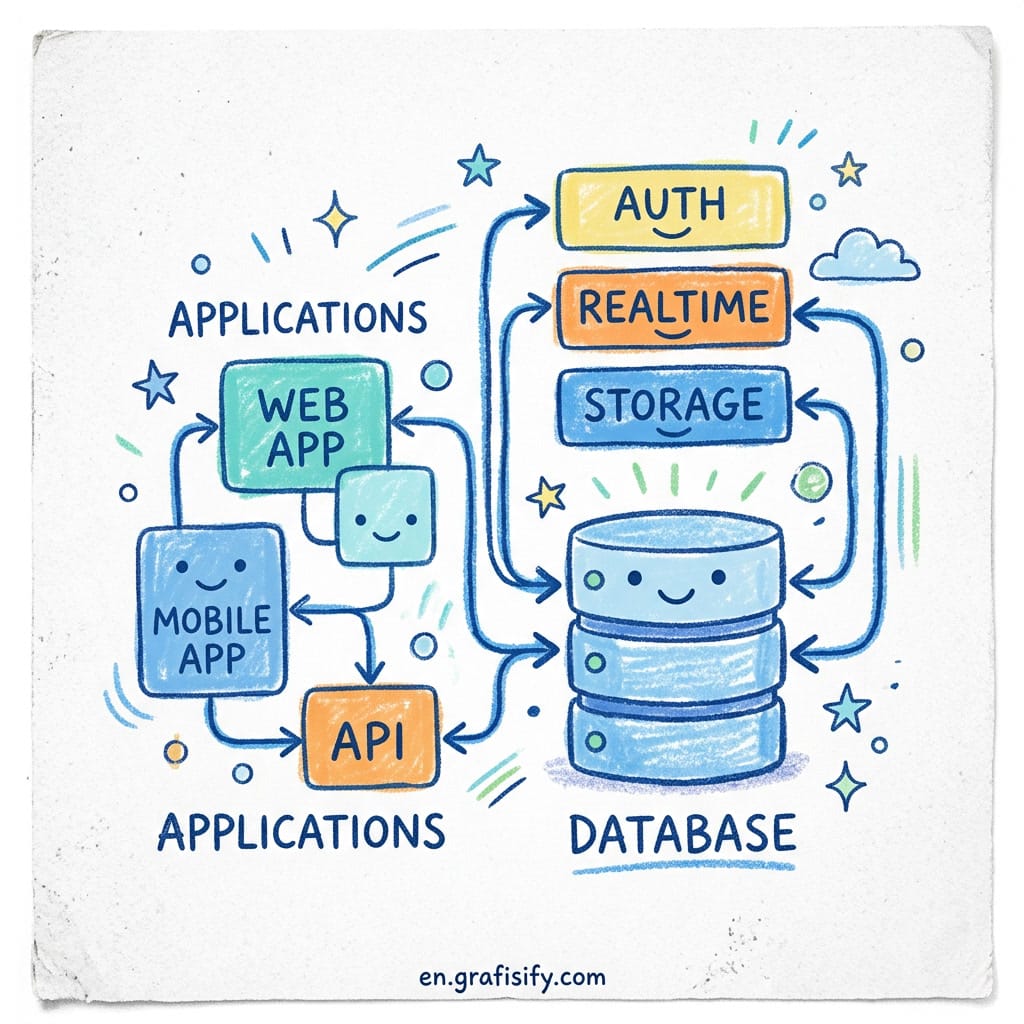
Quick Verdict: This complete Supabase tutorial for beginners shows you how to build a full-stack app without managing servers. You get a PostgreSQL database, user authentication, file storage, real-time updates, and auto-generated APIs from one dashboard. This tutorial walks you through setting up your first Supabase project, connecting it to a frontend, and understanding the key features every beginner needs.
Building the backend of an app used to mean setting up a server, writing API endpoints, configuring a database, and wiring up authentication. Then you had to deploy it all, keep it running, and handle scaling when traffic picked up. Thats a lot of work. This Supabase tutorial beginners full stack guide removes all that friction.
Supabase changes that completely. Its an open-source backend-as-a-service platform that bundles everything you need into one clean package. If you’re looking for a Supabase tutorial beginners full stack approach, this is exactly what you get: a database, auth, storage, and real-time.
Over 1.2 million developers now use Supabase for everything from side projects to production SaaS applications, according to Supabases own documentation. The platform has raised nearly $200 million from investors including Accel and Craft Ventures. But more importantly, it solves a real problem: giving developers the power of PostgreSQL without the operational headache.
What Is Supabase? A Supabase Tutorial Beginners Full Stack Guide
Supabase is an open-source backend platform built on PostgreSQL that gives you a fully managed database, authentication, file storage, real-time subscriptions, and serverless edge functions all from one dashboard. Instead of piecing together separate services for each part of your backend, you get them all with a single SDK.
The platform launched in 2020 and has grown fast because it fills a gap that Firebase left open. Firebase uses a proprietary NoSQL document database (Firestore). That works fine for simple apps, but as your data gets more complex, you hit walls. You can’t run JOIN queries across tables. You can’t enforce relational integrity. And if you ever want to move away from Firebase, your data is stuck in Googles ecosystem.
Supabase takes the opposite approach. It uses standard PostgreSQL, the worlds most trusted open-source relational database. Every skill you learn with Supabase transfers directly to any other PostgreSQL deployment. Your data is portable. You can self-host the entire platform if you ever need to. And you get access to advanced PostgreSQL features like full-text search, geospatial queries with PostGIS, and vector search through pgvector for AI applications.

Deep Dive: Core Supabase Features Every Beginner Should Understand
PostgreSQL Database with Auto-Generated REST and GraphQL APIs
The heart of Supabase is a managed PostgreSQL database. When you create a table in the dashboard or through a SQL migration, Supabase automatically generates REST and GraphQL APIs for that table. This is the core of any Supabase tutorial beginners full stack project: you define your data structure once, and the API is ready.
This is a huge help for beginners. You define your data structure once, and the API is ready. Want to add a new table? Create it, and the endpoint appears. The visual table editor in the Supabase dashboard works like a spreadsheet, so you can add rows and columns without touching SQL. But when you’re ready, the built-in SQL editor gives you full control over queries, migrations, and advanced operations.
The database supports PostgreSQL extensions out of the box. That means you can add pgvector for AI embeddings, PostGIS for location data, or pg_cron for scheduled tasks. For a beginner building their first app, this means you’ve got room to grow without switching platforms.

Authentication: User Signup, Login, and Social Auth
Supabase Auth handles user authentication with email and password, magic links, phone sign-in, and over 20 OAuth providers including Google, GitHub, Apple, and Discord. Setting up authentication takes about five lines of code on the frontend. The auth system integrates directly with your PostgreSQL database, which means every user gets a corresponding row in the auth.users table automatically.
Whats important for security is how auth connects to Row Level Security. When a user signs in, Supabase issues a JWT token containing their unique user ID. Your database policies can then check this token to decide whether the user can read or write each row. This tight integration between auth and the database is what makes Supabase secure by default.
Row Level Security: Protect Your Data at the Database Level
Row Level Security is probably the most important concept to understand in this Supabase tutorial beginners full stack guide. It is a PostgreSQL feature that lets you define access policies directly on your database tables.

Here is a simple example. Say you’ve got a table called todos with a user_id column. An RLS policy might say: “A user can only see rows where user_id equals their own auth ID.” Even if someone inspects your frontend code and finds your API key, they can’t access data they don’t own, because the database enforces the policy.
The critical rule for beginners: always enable RLS on every new table you create. When you create a table in Supabase, RLS is disabled by default. With RLS off, anyone with your public anon key can read and write every row. Enable it immediately, then add policies one at a time as you need them.
Real-Time Subscriptions and File Storage
Supabase real-time lets your frontend subscribe to database changes and receive updates instantly through WebSockets. When a row is inserted, updated, or deleted, every connected client gets the change within milliseconds. You can build live features like chat applications, collaborative editing, notification systems, and live dashboards without writing any server-side WebSocket code.
Supabase Storage provides S3-compatible file storage for images, videos, documents, and any other files your app needs. Like everything else in Supabase, access controls are managed through the same RLS policies. Each file lives in a bucket, and you can set policies per bucket or even per file path. The free tier includes 1 GB of storage with 2 GB of bandwidth, which is enough for most prototypes and small apps.
Pros and Cons of Supabase for Beginners

| Pros | Cons |
|---|---|
| Free tier is generous: 500 MB database, 50,000 monthly active users, unlimited API requests | Free projects pause after 1 week of inactivity (not ideal for always-on backends) |
| Full PostgreSQL with SQL support, joins, foreign keys, and extensions | Steeper learning curve than Firebase if you don’t know SQL |
| Open source with no vendor lock-in; you can self-host or migrate your database | Real-time features are solid but less polished than Firebase for mobile apps |
| Predictable flat pricing ($25/mo Pro) instead of pay-per-operation billing | Documentation can lag behind feature releases |
| Auto-generated REST and GraphQL APIs from your database tables | Fewer third-party integrations compared to Firebase ecosystem |
| Row Level Security enforces data access at the database level | Mobile SDKs not as mature as Firebas |
For most web applications and SaaS projects, the pros outweigh the cons significantly. The main limitation for beginners is the free tier inactivity pause. Your free project goes to sleep after one week of no activity, and the first request after that takes a few seconds to wake up. If you need a genuinely always-on free backend, this matters. For active development and learning, it’s rarely a problem.
Step-by-Step Supabase Tutorial Beginners Full Stack Project
Lets build a real project. Follow these steps to create a Supabase project, set up a database table, configure authentication, and connect everything to a frontend. By the end, you’ll have a working full-stack app skeleton you can build on.
Step 1: Create a Supabase Project
Go to supabase.com and sign up with your GitHub account or email. Once you’re in the dashboard, click New Project. Choose an organization, give your project a name, set a strong database password (save it somewhere safe), and select the region closest to your users. The project provisions in about two minutes.
After the project is ready, go to Settings > API. You’ll find two values you need: the Project URL and the anon public key. The anon key is safe to expose in frontend code because Row Level Security controls what each user can access. Never expose the service_role key in frontend code, as it bypasses RLS entirely.
Step 2: Create a Database Table
Go to the Table Editor in the Supabase dashboard. Click New Table and create a table called todos with these columns:
id(int8, primary key, auto-increment)created_at(timestamptz, default: now())user_id(uuid, references auth.users)task(text)is_complete(bool, default: false)
Enable Row Level Security immediately after creating the table. Go to the RLS toggle at the top of the table editor and turn it on. Then add policies:
- Users can read only their own todos (USING:
auth.uid() = user_id) - Users can insert todos with their own user_id (WITH CHECK:
auth.uid() = user_id) - Users can update their own todos (USING:
auth.uid() = user_id) - Users can delete their own todos (USING:
auth.uid() = user_id)
Step 3: Install the Supabase Client and Connect
Create a new frontend project. If you’re using React, run npx create-next-app@latest supabase-app or use Vite for a simpler setup. Install the Supabase client library:
npm install @supabase/supabase-jsCreate a .env.local file with your project credentials from Step 1. Then initialize the Supabase client in your app:
import { createClient } from '@supabase/supabase-js'

const supabaseUrl = process.env.NEXT_PUBLIC_SUPABASE_URL
const supabaseAnonKey = process.env.NEXT_PUBLIC_SUPABASE_ANON_KEY
const supabase = createClient(supabaseUrl, supabaseAnonKey)
Step 4: Add Authentication
Implement signup and login with Supabase Auth. Add a sign-in form to your app using the built-in auth functions:
async function signUp(email, password) {
  const { data, error } = await supabase.auth.signUp({
    email: email,
    password: password,
  })
  if (error) console.error('Error signing up:', error.message)
  else console.log('Check your email for confirmation!')
}

async function signIn(email, password) {
  const { data, error } = await supabase.auth.signInWithPassword({
    email: email,
    password: password,
  })
  if (error) console.error('Error signing in:', error.message)
}
Step 5: Read and Write Data
Now you can read and write data using the auto-generated API. Notice how we don’t need to write any backend code the database table directly exposes REST endpoints through the Supabase client:
async function loadTodos() {
  const { data: todos, error } = await supabase
    .from('todos')
    .select('*')
    .order('created_at', { ascending: false })
  if (error) console.error('Error loading todos:', error.message)
  return todos
}

async function addTodo(task) {
  const { data: { user } } = await supabase.auth.getUser()
  const { data, error } = await supabase
    .from('todos')
    .insert([{ task, user_id: user.id }])
  if (error) console.error('Error adding todo:', error.message)
}
That’s it. You have a working full-stack app with authentication, a PostgreSQL database, Row Level Security, and auto-generated APIs. Completing this Supabase tutorial beginners full stack project gives you a solid foundation. From here, you can add real-time subscriptions, file uploads with Storage, or Edge Functions for custom backend logic. The official Supabase documentation covers each feature in depth.

Final Thoughts
Supabase has become the backend platform of choice for thousands of developers because it removes the pain of infrastructure without taking away the power of PostgreSQL. For beginners, it’s one of the fastest ways to go from an idea to a working full-stack application. You learn real SQL skills that transfer anywhere, and you never get locked into a proprietary platform.
If you’re deciding between Supabase and Firebase, think about your data first. Does your app have relationships between users, orders, products, or messages? Do you need complex queries? Do you want predictable pricing? Supabase is the better choice for most web applications and SaaS projects. Firebase still wins for mobile-first apps with heavy offline requirements and deep Google ecosystem integration.
Start with the free tier. I have used Supabase for several side projects and the free plan handled everything from user authentication to file storage without costing a cent. Build a small project. Add authentication and a database table. Once you see how fast the workflow is, you will understand why so many developers made the switch.

Irfan is a Creative Tech Strategist and the founder of Grafisify. He spends his days testing the latest AI design tools and breaking down complex tech into actionable guides for creators. When he’s not writing, he’s experimenting with generative art or optimizing digital workflows.
You might also like







 Artificial Intelligent
 Design & Creative
 Freelance
 Gadgets & Gear
 Insights
 Laptop
 Reviews
 Smartphone
 Tech Guides
 Vibe Coding



